Systems Administrator Resume Example: Environment and Reliability
by Larbi SahliPublished
Describe Windows, Linux, identity, automation and recovery work accurately. A fictional sysadmin resume with metric checks, lab labeling and current credential guidance.
Users have landed jobs at
- 1Password
- OpenAI
- Notion
- justworks
On this page
A systems administrator resume should explain the environments you actually supported and the work you performed in them. The vacancy may emphasize Windows, Linux, cloud services or a mixed estate. Relevant breadth is useful; it does not automatically make you less credible in either environment.
This guide uses a fictional resume and practical prompts for identity, automation, patching, recovery and migrations. It does not present a verified survey of current postings or claim that an exact stack match guarantees an interview.
Explain actual environment, depth and scope
Choose relevant environments and describe your depth: production administration, shared support, migration contribution or a personal lab. Name distributions, platforms and versions when useful, without adding versions you have not used.
Scope can help: hosts versus virtual machines, managed identities versus people, and supported sites versus sites you administered directly. Use permitted figures only. A qualitative task can still be useful when scale is unavailable or confidential.
Use clear headings and selectable text, then inspect the export and application fields. No column layout guarantees parsing. See the format guide.
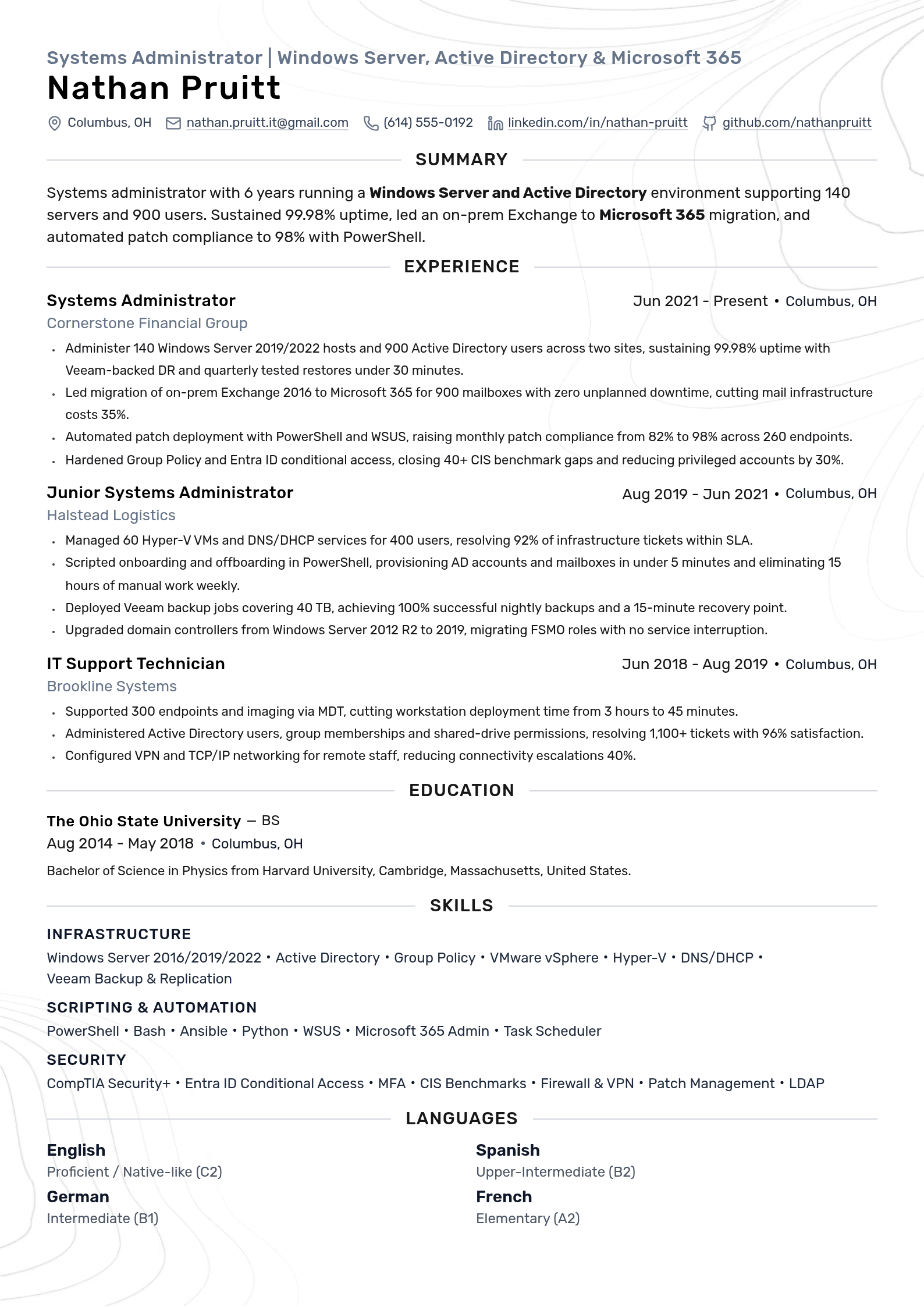
Fictional Windows-focused systems administrator resume
Fictional example: Andre Whitlow, Cedar Financial, Juniper Logistics, Alder Systems, Riverbend College, projects, training and recognition below are invented. Contacts and project links are placeholders. The dates show IT support and administration since 2018. No actual availability record, security certification or measured savings is asserted. Replace every entry and skill rating with your evidence.

Systems Administrator | Windows Server, Active Directory & Microsoft 365
Andre Whitlow
Summary
Systems administrator with IT support and administration experience since 2018. Works with Windows Server, Active Directory and Microsoft 365, using PowerShell to support repeatable administration and documented checks.
Experience
Systems Administrator
Administer Windows Server and Active Directory services and document service dependencies.
Supported an Exchange-to-Microsoft 365 migration, checking mailbox readiness and recording exceptions.
Maintain PowerShell patch-review and deployment routines, tracking missing updates and approved exceptions.
Review Group Policy and Entra ID access settings with the security team and document approved changes.
Junior Systems Administrator
Maintained Hyper-V virtual machines and DNS/DHCP services within the assigned environment.
Scripted selected onboarding tasks and checked permissions against approved requests.
Monitored Veeam jobs and assisted with scoped restore tests, recording outcomes and unresolved issues.
Supported a historical Windows Server 2012 R2 to 2019 domain-controller upgrade and validation work.
IT Support Technician
Supported endpoint imaging and workstation preparation using the deployment tools then in service.
Maintained approved account, group and shared-drive permission changes.
Investigated VPN and network connectivity requests and documented escalation details.
Education
Riverbend College
BS
Skills
Infrastructure
Scripting & Automation
Security
Languages
Projects
Home Lab AD Forest
Builder
https://example.com/portfolio
Built an isolated Active Directory lab on Hyper-V to practice Group Policy and configuration checks.
Used test VMs and synthetic identities; the exercise does not establish production scale or operational availability.
PowerShell Directory Review Lab
Author
https://example.com/portfolio
Built a lab script to identify stale test accounts and review sample Group Policy settings.
Used synthetic records and documented limitations; this is an independent exercise, not a published production tool.
Professional Development
Windows Administration Workshop
Cedar FinancialAwards
IT Support Team Recognition
Cedar Financial
Internal recognition for organizing migration readiness checks and exception records.
Systems Administrator resume keywords
Use the actual vacancy and your experience to select relevant platforms, methods and credentials. These terms are prompts, not universal requirements.
| Keyword | Type | Where to put it |
|---|---|---|
| Active Directory | Tool | Skills list, plus the bullet where you ran the domain |
| Windows Server | Tool | Skills list with versions, and one migration or upgrade bullet |
| VMware vSphere | Tool | Skills list, and the bullet with host and VM counts |
| PowerShell | Tool | Skills list, and the bullet about what you automated |
| Microsoft Entra ID (Azure AD) | Tool | Skills list; say whether it was hybrid or cloud-only |
| Group Policy | Tool | One experience bullet, next to Active Directory |
| Microsoft Intune | Tool | Skills list, with the number of devices you managed |
| Patch management | Skill | Experience bullet with cadence and compliance percentage |
| Veeam Backup & Replication | Tool | Skills list, plus the bullet about tested restores |
| DNS and DHCP administration | Skill | Relevant skills or a specific DNS/DHCP task |
| Red Hat Enterprise Linux | Tool | Skills list if you support Linux, with the version |
| CompTIA Security+ | Certification | Exact earned name, issuer and current status |
| Microsoft Windows Server credential | Certification | Use exact name and status from your credential record; routes have changed |
| CIS Benchmarks | Methodology | Actual benchmark version and scope; not a security guarantee |
| Uptime percentage | Metric | Summary and the reliability bullet, with the measurement window |
| Patch compliance rate | Metric | Experience bullet, with fleet size and time frame |
A skills list can name relevant tools, while an experience or project example explains use. A keyword comparison cannot reveal the employer’s private screening rules. See keyword guidance.
What to learn from the example
The example separates production tasks from a home lab and identifies specific work such as permission changes, patch review and restore-test support. It does not claim that every task needs a percentage or that a successful backup job proves recovery.
A summary can briefly state relevant environment and contribution; see summary guidance. Group skills if useful, and distinguish earned credentials from internal training. No required top-third placement or fixed summary formula applies.
Adapt the evidence for Linux or mixed environments
The following comparison gives possible technologies to consider, not mutually exclusive tracks or a second complete resume. Windows and Linux can run in either major cloud platform and within the same organization.
| Area | Possible Windows evidence | Possible Linux evidence |
|---|---|---|
| Operating systems | Actual Windows Server versions and tasks | Actual distributions, versions and tasks |
| Identity | AD DS, Group Policy or Entra ID, accurately distinguished | Actual LDAP, FreeIPA, SSO or sudo work |
| Scripting | PowerShell or other tools actually used | Bash, Python or other actual tools |
| Virtualization and cloud | Actual hypervisors and cloud services | Actual hypervisors, cloud services and containers |
| Configuration | Actual policy, device or configuration work | Actual configuration and infrastructure tooling |
| Credentials | Relevant earned Microsoft or other credential status | Relevant earned Linux or other credential status |
Describe actual Linux distribution and task experience where relevant. Infrastructure-as-code, containers and CI/CD may be useful for some roles, but Linux administration is not automatically a junior DevOps role.
Label independent labs and coursework clearly. Do not equate deploying a lab VM with supporting production users or claim tools used by colleagues as your own. A base resume can retain both Windows and Linux evidence for truthful tailoring.
Select relevant systems-administration capabilities
There is no documented fifty-posting analysis behind this page, so the list below does not rank current market demand. Compare it with the specific vacancy and include only relevant capabilities you actually possess.
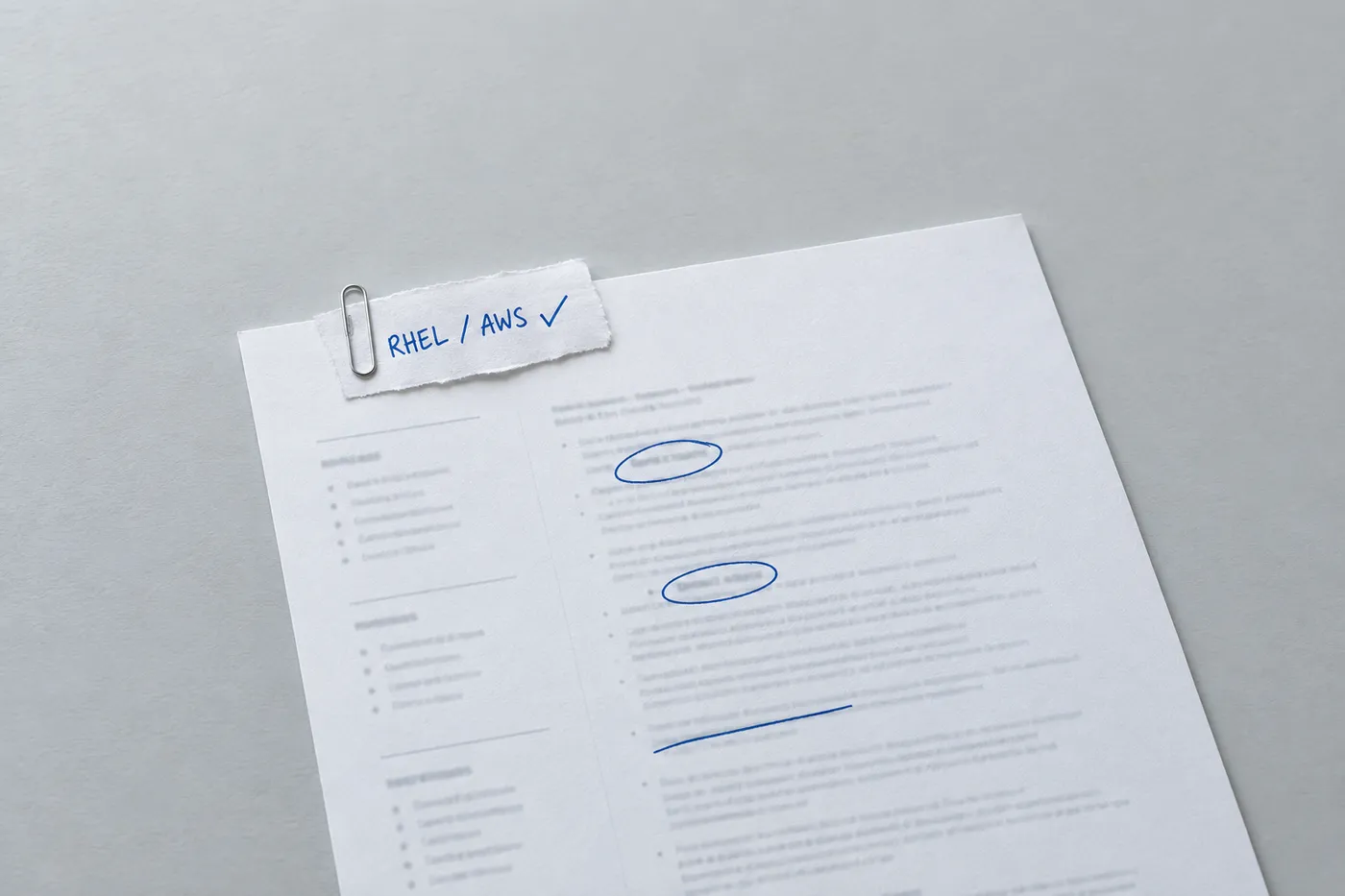
- Operating systems: actual distributions and versions, with production or lab context.
- Identity: distinguish Active Directory Domain Services from Microsoft Entra ID; LDAP is a protocol, not the same product.
- Automation: scripts or configuration work you actually created or maintained.
- Virtualization and cloud: actual services and administration depth; neither cloud belongs exclusively to one OS.
- Networking: relevant DNS, DHCP, routing, VPN or firewall tasks.
- Backup and recovery: tools used, test scope and actual results, distinct from objectives.
- Security: actual patching, access, hardening or incident-support work without blanket assurance.
- Endpoint management: actual provisioning and device-management responsibilities.
- Service work: actual ticketing tools, communication and carefully defined service measures.
Communication can appear in a skills list and be supported by a specific incident or handoff example. Fictional example: “Prepared service-impact updates for the incident lead and documented the recovery handoff.” This does not claim that you owned incident command or restored the service alone.
Technical and interpersonal requirements vary. Keyword matching does not make parsing correct or verify proficiency. See skills guidance.
Define reliability, security and migration claims
For each claim, distinguish the task, measured scope and result. If the result is unknown, explain the work rather than inventing one. Protect infrastructure diagrams, credentials, client details and incident information.
Uptime and reliability
Define the service, measurement window, exclusions and method behind an availability figure. VM uptime is not necessarily application availability, and averaging host percentages may not represent the service users experienced.
Backup job success, restore-test success and end-to-end recovery are different. State the data restored, test scope and observed time. An RTO is a recovery-time objective; an RPO concerns the point to which data must be recovered. Nightly successful backups alone do not demonstrate a fifteen-minute RPO or a thirty-minute full-service recovery. See NIST contingency-planning guidance.
Response time, resolution time and recovery time are also different measures. Explain which you tracked and avoid attributing a team-wide result solely to yourself.
Security
Describe actual security work: patch validation, access review, hardening checks or MFA rollout support. A compliance percentage needs a defined eligible fleet, update set, deadline and exclusions. A benchmark check is not proof that the system is secure, and fewer incident tickets may reflect reporting changes rather than fewer threats.
Hypothetical arithmetic: patch compliance rising from 82% to 98% is 16 percentage points, about 20% relative. It does not establish vulnerability elimination. Microsoft describes WSUS as deprecated but still supported according to its lifecycle; do not call it retired or recommend it as a new-feature platform.
Migrations
State what moved, your contribution and any verified scope or disruption measure. Distinguish a mailbox migration from an entire messaging-service transition, and no business-hours disruption from no downtime at all. “Zero data loss” needs validation rather than an assumption from a successful migration job.
Historical work remains valid. Microsoft documents that Exchange 2016 and 2019 reached end of support in October 2025, and announced MDT retirement in January 2026. Describe when you used those products without presenting them as current deployment recommendations.
Include relevant operational work as well as migrations. Planning ability is not exclusive to large projects; see bullet-selection guidance.
List earned credentials and current status
List actual earned credentials with their exact names, issuers and status. A certification may be required by a particular vacancy, but it is not universally required for systems administration. Place important qualifications clearly without imposing a top-third layout rule.
- Use the credential name and level actually earned; an exam code is not itself a certification.
- Check current Microsoft names, retirement and renewal guidance before making a new study recommendation.
- List actual Red Hat, CompTIA or other credentials by relevance without implying universal employer demand.
- Distinguish an active credential, a historical award and an expired status accurately.
- Describe exam study separately; “exam scheduled” is appropriate only when booked and does not satisfy a requirement for an earned credential.
Check the issuer before recommending a new qualification or claiming one is current. Microsoft’s current Windows Server credential page uses “Windows Server Administrator Associate.” Historical credential names and exam routes may differ. Use the name and status shown on your own credential record; do not silently upgrade or rename an award.
Course attendance, webinar badges and exam preparation can be relevant professional development, but are not equivalent to an earned certification. See placement guidance.
Tailoring your resume for different IT environments
Read the actual responsibilities rather than assuming all managed service providers want ticket volume, all enterprises reject breadth or all startups expect one person to own everything. Multi-client support, regulated change processes, cloud operations and hands-on troubleshooting can matter in different combinations.
Keep an accurate base history and select relevant evidence for each application. An AI assessment cannot reveal the employer’s ATS score or verify your technical depth. Check every suggested platform, number and responsibility. See tailoring guidance.
Build and inspect the final document
Use Roleframe to organize the resume and replace fictional details. Inspect imported names, dates, links and technical terms against the original, and check current feature availability.
Follow accepted file formats and inspect the export and populated application fields. PDF can preserve appearance but does not guarantee identical rendering or correct parsing everywhere.
Frequently asked questions
- Which skills should a systems administrator list?
Relevant operating systems, identity, automation, networking, service and recovery capabilities actually used. There is no universal top-five ranking; match the specific vacancy without inventing experience.
- What should the summary say?
Actual environment and contribution, with supported scope where useful. A summary is optional and does not require a numerical result or fixed line count.
- Should it be one page or two?
Follow application instructions and use enough space for relevant evidence. No fixed five-year threshold applies. See length guidance.
- What responsibilities are useful evidence?
Actual administration, access, patching, recovery, troubleshooting and communication tasks. A qualitative contribution is valid; not every responsibility needs a quantified result.
- How should I describe on-call work?
State actual rotation, incident role and handoff responsibilities. Do not assume every sysadmin is on call or claim all incident outcomes as personal achievements.
- How can a junior candidate use this example?
Label labs, coursework and support work accurately. Production and lab experience are different and neither should be misrepresented. A lab does not automatically outweigh relevant employment.
- Should I submit PDF or Word?
Use accepted formats and follow employer instructions. Inspect exported text and populated fields; neither format guarantees parsing.
- Can I list Windows and Linux together?
Yes, when you have relevant experience in both. Explain depth and select emphasis for the vacancy. Mixed-environment experience does not inherently make you less qualified.


Build yours on the same template.
Every example here is built on a template you can open in the editor. Start from the same layout and write your own experience into it, then download the PDF free, as often as you like.


