A cover letter editor that matches your resume.
A real block editor, not a text box. Your resume sits open beside the letter, the letter inherits the resume’s theme, and the pair goes out looking like one piece of work.
- Free plan, no credit card
- Selectable-text PDF
- Nothing invented, ever
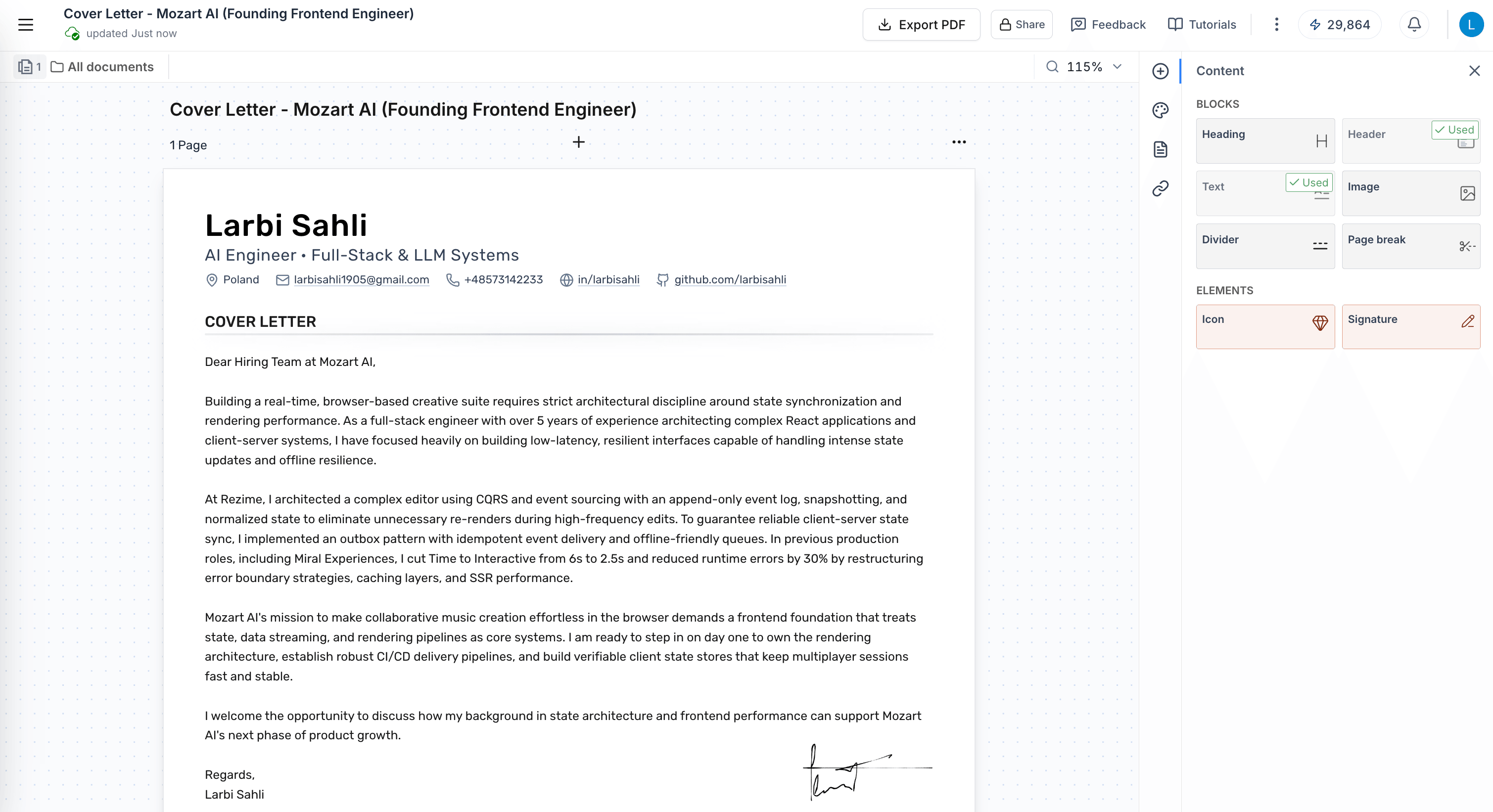
Six blocks, one page, and full control of the layout.
The letter is built from blocks you drag onto the page: heading, header, text, image, divider, page break. Most letters need three of them. Everything else is there when the page asks for it.
Drag any of them onto the page. A letter usually needs three.
Drag, drop, reorder
Move the letterhead below the date, or the signature above a postscript. Nothing is fixed.
Columns when you want them
Split a row for a contact column or a logo, and drag the divider to resize it.
Duplicate and lock
Copy a block, repeat it, or lock the letterhead so it never moves while you write.
Stays on one page
Live pagination shows the page edge as you type, with a manual break if you need a second.
Your resume sits beside the letter.
Every cover letter is linked to a resume, and that resume stays one panel away while you write. It is the reason the letter can be specific without you retyping a single date.
- Written from that resume. The draft only uses experience the linked document can back up.
- One click back. Open the resume, edit it, return to the letter where you left off.
- Tailored branches too. Generate from a branch and the letter follows that version of your story.
Every claim in the letter traces back to this document.
Write it on the page, not in a form.
The body of the letter is a full rich-text surface. Select a phrase and the toolbar comes to it, so the thing you are formatting is the thing you are looking at.
Your posting asks for someone who can standardise front-end delivery across teams. At Kestrel I led that migration across 11 product teams and cut build times 41%, the same problem one company earlier.
I would bring the same instinct to NorthBridge: fewer bespoke components, one shared system, and a release process the whole team can read.
- Inline and WYSIWYG. Edit directly in the canvas. What you see is what exports.
- Full formatting set. Headings, fonts 8–48px, colour, highlight, lists, alignment, links.
- One editor everywhere. The same rich text powers your resume content and your letters.
One theme. Two documents that arrive as a set.
The letter takes the resume’s letterhead: the same name block, the same rule, the same colour and type. A hiring manager opens two files and sees one person who cared about the details.
Control every layer of the look.
Theme the whole document, then go down to a single block if you want to. The page size, the columns and the breaks are yours as well.
Style & theme
- Document theme colour
- 7 fonts
- 12 background presets
- Solid or gradient banner
- Page margin slider
- Block spacing slider
- Per-block typography
- Size, weight, italic, case, letter-spacing, colour
Layout & control
- A4 or US Letter
- Multi-column rows
- Automatic pagination
- Manual page breaks
- Drag-to-resize columns
- Zoom 100–125%
- Lock and unlock blocks
- Copy, paste, duplicate (⌘C / ⌘V)
- Page navigator
- Live page thumbnails
Generate the draft. Then edit it like anything else.
Pick a tone and a length, and Roleframe writes a first pass from the resume you linked. What comes back is an ordinary document in the ordinary editor, so every word is yours to change.
Each tone is a different prompt with different behaviour, not an adjective on a chip.
Short fits half a page. Standard is the three-paragraph letter most roles expect.
It only writes what your resume can prove.
Every number in the letter exists in the linked document. If the resume doesn’t say it, the letter doesn’t claim it.
How the generator worksStart from a letterhead, not a blank page.
Every template arrives already themed and ready to type into. Pick the one that sits closest to your resume, or let the letter take your resume’s design outright.


However they want to receive it.
Selectable-text PDF
A real text PDF at A4 or US Letter, not a flattened image, so parsers and humans both read it.
Send email
Mail the letter and the resume straight to the hiring contact, from inside Roleframe.
Live share link
Send a link instead of an attachment. Revoke it whenever you like.
Attached to the job. Letters live with the resume and the posting on the job card in your tracker.
Open the trackerNothing to save. Ever.
Every keystroke is written as you type it. There is no save button, because there is nothing waiting to be saved: each change lands in an append-only log the moment you make it, so closing the tab mid-sentence costs you the sentence you were still thinking about and nothing else.
- 14:02:11Body paragraph edited
- 14:01:48Theme color set to cobalt
- 14:01:20Header block moved above date
- 13:59:06Draft generated from base resume
Questions
Questions, answered.
Is it really free?
Can I write one from scratch?
Will it match my resume’s design?
Does the AI make things up?
What can I export?
Can I have more than one letter per resume?
Send a letter worth reading.
Your cover letter shares the letterhead of your resume and opens in the editor you already know. Write it yourself or have Roleframe draft it from the job posting, using only what your resume can back up.


