Front End Developer Resume Example: React, Performance and Accessibility
by Larbi SahliLast Updated
A fictional frontend developer resume with React examples, defined performance measures, scoped accessibility claims and guidance for Vue or Angular applications.
Users have landed jobs at
- 1Password
- OpenAI
- Notion
- justworks
On this page
A useful front end developer resume explains what you built, the tools you used and the effect you can support. Performance measures can help, but a specific accessibility fix, testing responsibility or component-design decision is valuable even without a numerical result.
This guide reviews a fictional React-focused example and shows how to adapt the emphasis for Vue or Angular roles. It also explains how to distinguish lab measurements from field data and automated accessibility checks from a full evaluation.
What Front End Developer Resumes Get Wrong
Check whether your resume makes the following information clear:
- Relevant skills and depth: distinguish production work, project use and introductory exposure.
- Actual contribution: explain the component, workflow or problem you owned or supported.
- Supported results: identify how a measurement was taken, or describe the implemented change without inventing a number.
- The target role’s stack: make relevant frameworks and web fundamentals easy to find.
- Appropriate working links: include a portfolio or code sample if it adds evidence and you can share it.
Choose detail that answers the vacancy. A few clear examples can show more than a long technology list, and there is no fixed skills count or reading-time formula that applies to every reviewer.
Front End Developer Resume Example (React Focus)
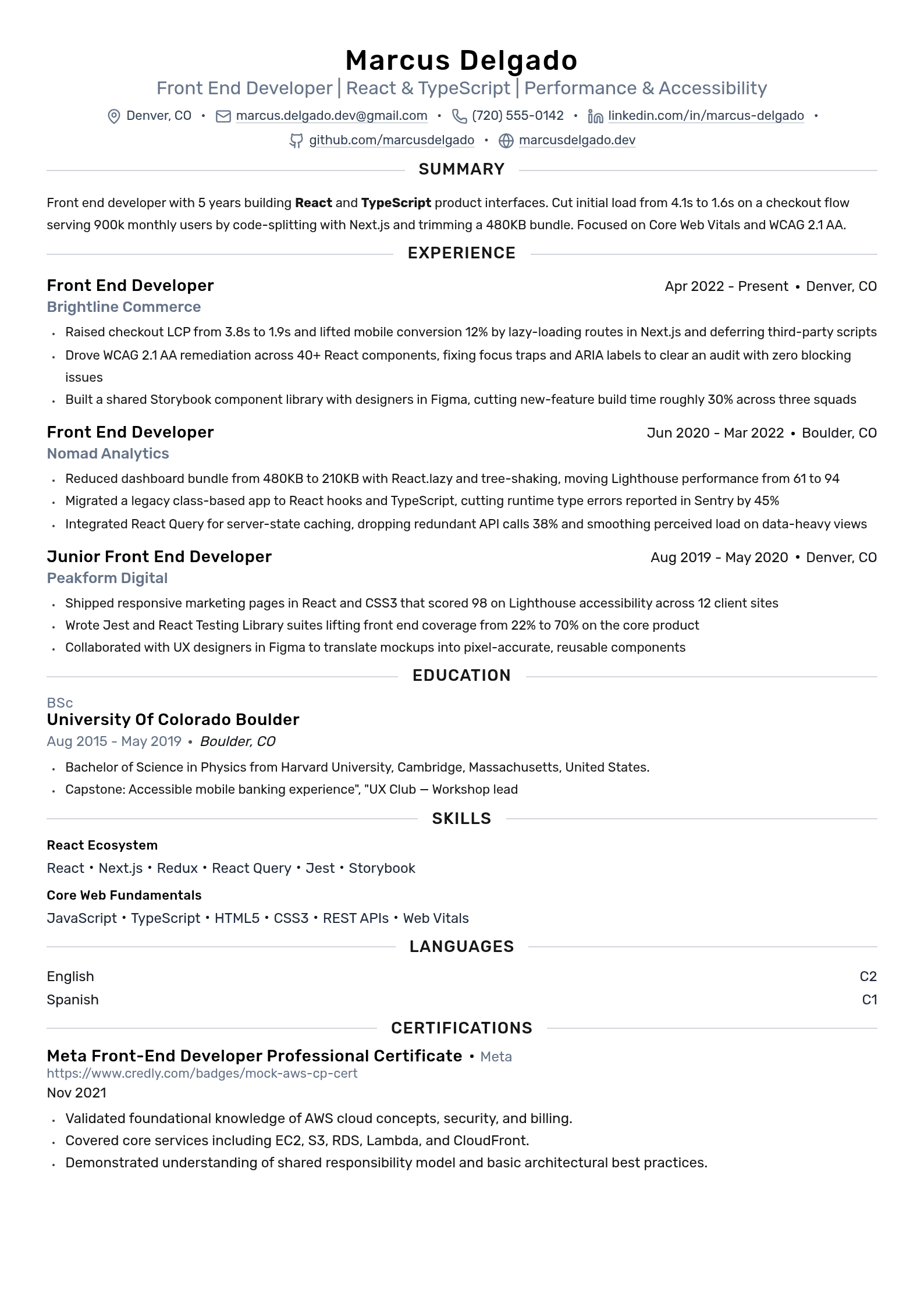
Isaac Feldman is a fictional developer with about five years of experience at the September 2024 snapshot. React and TypeScript are the focus of this example, not a claim that most unnamed roles use React. Employers, credentials, awards and measurements are illustrative, with placeholder links.
The current model spans two pages. It separates field LCP from lab Lighthouse results and describes the tested accessibility scope without asserting complete WCAG conformance.
Front End Developer resume keywords
Use relevant framework, testing, performance and accessibility terms from the actual vacancy when they describe your work. This checklist is not a survey of employer filters.
| Keyword | Type | Where to put it |
|---|---|---|
| React | Tool | Skills and relevant work examples; repeat only where useful |
| JavaScript | Tool | Skills list, under languages |
| TypeScript | Tool | Skills list and the bullet where you migrated files |
| HTML/CSS | Tool | Skills list, under fundamentals |
| Next.js | Tool | Skills list and the bullet about routing or rendering |
| Core Web Vitals | Metric | Name the metric and whether the measurement is lab or field data |
| WCAG version and level | Standard | State the criteria and tested scope; distinguish fixes from full conformance |
| Redux | Tool | Skills list and the bullet about shared state |
| REST APIs | Skill | The bullet where you wired the UI to data |
| Responsive design | Skill | Skills list, plus the breakpoint work in a bullet |
| Jest | Tool | Skills list, beside the component coverage you added |
| React Query | Tool | Skills list and the data fetching bullet |
| Storybook | Tool | Skills list and the component library bullet |
| Figma | Tool | Tools line, plus the designer handoff bullet |
| Bundle size | Metric | Performance bullet, with the before and after numbers |
| Meta Front-End Developer Professional Certificate | Course-based credential | Certifications, with the year, below your degree |
Add only the terms that describe work you have actually done, and put each one inside a line that shows the result. To check a specific posting rather than this general list, run it through the free resume keyword scanner, or see the full resume keywords by job title.
Why the summary works
The optional summary identifies relevant tools and experience, then gives a defined contribution supported below. It does not need a fixed three-line length or a numerical result. If you include years of experience, make the dates consistent and distinguish professional work from training.
Why the experience bullets work
The experience entries vary by contribution: code delivery, performance investigation, accessibility fixes and design collaboration. When using a measure, identify what changed and how it was observed. “Built components” can be useful if followed by their purpose and your design or implementation responsibility; a percentage is not required.
Why the skills section works
The model groups core web skills and the React ecosystem. Grouping helps readability, while the experience entries explain important tools in context. Select relevant actual capabilities and identify training or project exposure where needed. No grouping guarantees how an applicant tracking system parses or ranks the file.
Adapting the Example for a Vue or Angular Focus
For another framework, retain your actual work history and change the emphasis to the vacancy. Do not rewrite React work as Angular or Vue experience.
Angular: name the versions and capabilities used, such as TypeScript, routing, forms, RxJS, state management or Angular Material. Explain an upgrade or shared-library task if you performed one. Testing stacks vary by project age; current Angular documentation uses Vitest for new projects, while an older project may use Jasmine and Karma.
Vue: identify the version and work performed with the Options API or Composition API, Nuxt or a state library when relevant. Older Vue work can still demonstrate useful experience; explain maintenance or migration rather than hiding it.
Across frameworks: a broad background can be valuable. Make the most relevant experience easy to find and keep skill levels accurate across tailored versions. Framework choice alone does not establish the employer’s industry or candidate supply.
Framework terms to compare with the actual posting
Specific names help a reader understand the technologies you used. The table offers examples to select from, not required keywords or a map of market demand. Match terminology where it is accurate; screening behavior differs between employers and systems.
| Framework focus | Core areas | Possible ecosystem tools | Useful work evidence |
|---|---|---|---|
| React | React, JavaScript, TypeScript, HTML, CSS | Next.js, Redux, React Query, testing libraries, Storybook, Vite | Component behavior, rendering, data fetching and tests |
| Angular | Angular, TypeScript, templates, forms, RxJS where used | Angular Material, NgRx, Vitest or the project’s actual test stack | Application features, migrations, state and testing responsibilities |
| Vue | Vue version, JavaScript/TypeScript, actual API style | Nuxt, Pinia or Vuex, Vite, Vitest where used | Component architecture, maintenance or migration and user flows |
Include relevant web fundamentals, testing and collaboration capabilities alongside the framework. A posting may emphasize semantic HTML, CSS, responsive behavior, APIs or another area. Use clear names without adding tools you have not used or assuming exact wording ensures a match.
Highlighting Performance Optimization and Accessibility (a11y)
Performance and accessibility entries are stronger when their scope is clear. A named tool or standard is not itself proof of seniority, conformance or business impact.

Performance: name the metric, then the mechanism
Core Web Vitals currently cover loading with LCP, visual stability with CLS and responsiveness with INP. Describe the page or flow, population or test setup, period and metric used. Separate field measurements from synthetic lab runs; a Lighthouse performance score is not the same as real-user Core Web Vitals.
For example, “Reduced mobile checkout p75 LCP from 3.8s to 1.9s across comparable 28-day field windows after deferring noncritical scripts” explains the measure and work. Bundle-size comparisons should state the basis, such as gzip transferred bytes. If you did not measure a result, describe the implementation without inventing one.
Historical dates matter: INP was introduced in 2022 and replaced FID in March 2024. The sample’s 2021 monitoring project therefore lists FID.
Accessibility: standards, not sentiment
Describe the actual accessibility work: keyboard behavior, accessible names, semantic markup, focus management and the flows tested. A useful example is “Fixed keyboard-focus and accessible-name issues in checkout components; tested selected flows with axe, keyboard navigation and a screen reader.”
Automated tools can identify some issues, but cannot establish full accessibility on their own. Name the WCAG version, level and evaluation scope only when supported. A component fix or high Lighthouse score does not certify an entire product. W3C explains tool limitations and conformance evaluation.
How to List Your UI/UX Collaboration Experience
Show collaboration through concrete work: component APIs, documented states, design tokens, handoff decisions or reviewed user flows. Explain your contribution and the other roles involved rather than relying only on “strong communication.”
- Name relevant tools and practices you used, such as Figma, Storybook, design tokens or design reviews.
- Describe the contribution: “Worked with two designers to document form states and implement reusable components.”
- State design-system responsibility accurately: building a component, maintaining a library and owning the whole system are different scopes.
- Explain a feasibility or accessibility decision and what shipped; do not invent a delivery-time improvement to complete the bullet.
A personal project can also show implementation decisions and documentation. Label it accurately, explain your role and link shareable work if useful. It need not have real customers or public popularity to demonstrate a technical contribution.
Edit your resume and check the exported file
Use the free manual resume editor to arrange your actual roles, skills and projects and export a PDF without an account. Inspect the result for layout, page count and working links. Follow the employer’s requested format and check any extracted application fields.
For account-based document and job-fit tools, open Roleframe. If you import a resume, review the imported text, roles and dates for accuracy before using it.
Review suggested wording against your actual work
Compare the resume with a real posting and review any suggested edits for factual accuracy. Missing measurement data cannot be solved by adding a plausible percentage. Keep technology versions, dates, individual contribution and testing scope consistent.
Roleframe’s assessment is a writing aid, not an employer ATS score or a guarantee of an interview. Use feedback to clarify relevant evidence, then inspect the final document yourself.
Frequently asked questions
- How long should a front end developer resume be?
Use a readable length appropriate to the relevant experience and application instructions. One or two pages can be reasonable; there is no universal eight-year cutoff. The editable sample currently spans two pages.
- Should I list every framework and library I've ever used?
Select relevant technologies you can explain and describe depth accurately. A broad framework background is not inherently shallow. Lead with what best answers the vacancy and retain other useful experience.
- How do I write a front end developer resume with no professional experience?
Describe genuine coursework, training and personal or collaborative projects with their setting, methods and your contribution. A project can be useful without real users or a measured business outcome. Do not convert practice work into employment.
- Is a React developer resume different from a front end developer resume?
A React-focused version emphasizes actual React work, related tools and relevant fundamentals. Keep historic job titles truthful, and use a target headline only when it accurately describes your capabilities.
- Should I include my GitHub and portfolio links?
Include relevant working links if you have shareable evidence. They are useful but not universally required; confidential work can be described at an approved level. Check that links and contact details work.
- Should I send my front end resume as a PDF or a Word document?
Follow the employer’s requested format. If PDF is accepted, inspect the export and check application fields populated from it. No file format guarantees identical rendering or perfect parsing in every system.


Build yours on the same template.
Every example here is built on a template you can open in the editor. Start from the same layout and write your own experience into it, then download the PDF free, as often as you like.


