
Frontend Skills Recruiters Look for in 2026
Recruiters scan for two things on a frontend resume: your core stack (React, TypeScript, modern CSS) and proof you can ship real UI work.
This guide is a frontend developer resume skills list you can copy, plus examples that show how to prove skills in Projects and Experience bullets.
If the job post says React + TypeScript, those exact words should appear in Skills and in at least one bullet under Experience or Projects.
Must-Haves
Core Frontend Skills to List
- Languages: JavaScript (ES6+), TypeScript, HTML, CSS
- Frameworks: React, Next.js (optional), Vue (optional)
- Styling: Tailwind CSS, CSS Modules, Styled Components
- State: React state, Redux/Zustand (when needed)
- Data: REST APIs, GraphQL (optional), async state (loading/error)
- Testing: Jest/Vitest, React Testing Library, Cypress/Playwright
- Accessibility: semantic HTML, keyboard navigation, ARIA basics
- Performance: Core Web Vitals, image optimization, code splitting
- Tooling: Git/GitHub, Vite/Webpack, CI basics, Vercel/Netlify
Writing Frontend Experience Bullets That Convert
Most frontend resumes fail because the bullets are vague. ‘Built components’ does not tell a recruiter anything.
Your bullets should show scope, stack, and outcome. If you do not have hard metrics, use concrete results like fewer bugs, faster release cycle, improved UX, or reduced manual work.
- Weak: Built UI components using React and TypeScript
- Strong: Built a reusable form system in React + TypeScript with validation and error states, reducing bugs and speeding up new page delivery
- Weak: Improved site performance
- Strong: Improved Core Web Vitals by optimizing images and splitting routes, reducing LCP and making key pages feel faster
- Strong: Integrated REST APIs with loading/error/empty states and pagination, improving perceived UX and reducing support issues
- Strong: Added RTL tests for critical components and E2E tests for the main flow, reducing regressions during releases
Bullet structure that works: Action + scope + tech + outcome. Example: ‘Implemented X in React/TS to achieve Y.’
ATS Keywords for Frontend Roles
ATS systems and recruiters both rely on keywords. The goal is not stuffing. The goal is placing the right terms in the right sections.
Put core keywords in Skills, then prove them in Projects and Experience (one real bullet is enough).
- React, TypeScript, JavaScript, HTML, CSS
- Responsive design, mobile-first, cross-browser
- Next.js (if used), routing, SSR/SSG
- REST API, fetch/axios, pagination, caching
- Testing: Jest/Vitest, React Testing Library, Cypress/Playwright
- Accessibility: WCAG, semantic HTML, ARIA
- Performance: Core Web Vitals, image optimization, code splitting
- Tooling: Git, CI/CD basics, Vercel/Netlify
Checklist
Frontend Resume Skills Checklist (Copy and Customize)
Use this as a starting point. Remove anything you cannot explain confidently in an interview.
For junior roles, keep it short. For mid roles, add testing, accessibility, and performance proof.
- React, TypeScript, JavaScript
- HTML, CSS, responsive design
- REST APIs, async state (loading/error)
- Testing basics (RTL/Jest) or E2E (Cypress/Playwright)
- Accessibility basics (semantic HTML, keyboard navigation)
- Performance basics (Core Web Vitals, image optimization)
- Git and a basic PR workflow
If your resume only has a Skills list, you are missing the proof. Add at least one project bullet that demonstrates React/TypeScript and one bullet for API integration.
Avoid These
Common Mistakes on Frontend Skills Sections
A frontend skills section should help a recruiter confirm fit in 5 seconds.
These mistakes are common and easy to fix.
- Listing too many tools you cannot explain or demonstrate
- Missing the core stack terms the job post asks for (React, TypeScript)
- No proof in Projects or Experience that you used the listed skills
- Using vague words like 'performance' without describing what you improved
- Not mentioning accessibility or testing at all, even at a basic level
Keep Skills short and prove the rest in bullets. That is what gets interviews.
Placement
Where to Put Frontend Skills on Your Resume (Skills vs Projects vs Experience)
A strong frontend resume does not only list skills. It proves them. The fastest way to do that is to place skills in three spots: a short Skills section, your Projects bullets, and your Experience bullets.
Think of Skills as the index. Projects and Experience are the evidence. If a recruiter sees React and TypeScript in Skills, they will look for one or two bullets that show how you used them.
If you only have personal projects, that is fine. Write them like real work and be specific about what you built and what improved.
- Skills section: 8 to 14 keywords max. This is for fast scanning and ATS searches.
- Projects: 2 to 3 projects. Each project should include the stack and 2 to 3 bullets with proof.
- Experience: 3 to 6 bullets per role. Use action, scope, tech, and outcome.
- Summary: mention your core stack once (React, TypeScript, Next.js if true).
- Do not: rely on icons, progress bars, or skill ratings. They are low signal and can break parsing.
A simple rule: list React and TypeScript once in Skills, then prove each in one bullet under Projects or Experience.
React + TypeScript
React and TypeScript Skills That Recruiters Actually Notice
Many resumes say React and TypeScript. Fewer show depth. You do not need advanced buzzwords, but you should show you can build real product UI.
If you are junior, show fundamentals. If you are mid, show reliability habits. If you are senior, show ownership, system thinking, and design decisions.
- React fundamentals: components, hooks, controlled forms, routing, state and derived state
- TypeScript basics: typed props and state, union types, narrowing, shared types for API responses
- Reusable UI: component patterns, composition, consistent spacing and typography tokens
- Async UI: loading, error, empty states, pagination, retries
- Code quality: readable code, PR reviews, refactors that reduce duplication
If you claim TypeScript, show it once in a bullet: 'Typed API responses and component props to prevent runtime errors and improve refactor safety.'
Testing
Testing Skills for Frontend Resumes (What to List and How to Prove It)
Testing is a strong differentiator on frontend resumes because it signals reliability. Recruiters do not need a long list of tools. They want proof you can protect critical flows.
List one unit or component testing tool and one E2E tool if you used it. Then prove it with one bullet that mentions what you tested and why.
- Component testing: Jest or Vitest with React Testing Library
- E2E testing: Cypress or Playwright for the main user flow
- What to test: forms, auth, checkout, onboarding, core navigation
- What to say: reduced regressions, improved release confidence, faster reviews
Example bullet: 'Added RTL tests for a form validation flow and Playwright E2E coverage for onboarding, reducing regressions during releases.'
Accessibility
Accessibility Skills (a11y) to Include for Frontend Roles
Accessibility is increasingly expected for frontend roles. You do not need to be an accessibility specialist, but basic awareness is a strong signal.
If you mention accessibility, keep it concrete. Use terms like semantic HTML, keyboard navigation, ARIA basics, and contrast. Then attach it to what you built.
- Semantic HTML: correct headings, buttons, labels, lists
- Keyboard navigation: focus states, tab order, skip links
- ARIA basics: roles and labels only when needed
- Forms: proper labels, error messages, field descriptions
- Images: meaningful alt text for informative images
Example bullet: 'Improved accessibility by fixing form labels, focus order, and keyboard navigation for the primary flow.'
Performance
Performance Skills That Matter (Core Web Vitals)
Performance is a keyword recruiters search for, but it is often vague on resumes. Tie it to Core Web Vitals and concrete actions.
Core Web Vitals are real user experience metrics for loading, interactivity, and visual stability. The common ones are LCP, INP, and CLS.
You do not need perfect metrics. Show the engineering moves you made: image optimization, reducing re-renders, code splitting, and avoiding layout shift.
- LCP (Largest Contentful Paint): improve by optimizing images, fonts, and critical rendering
- INP (Interaction to Next Paint): improve by reducing main thread work and expensive renders
- CLS (Cumulative Layout Shift): improve by reserving space for images and avoiding late layout changes
- Practical actions: image optimization, lazy loading, code splitting, memoization where needed
Example bullet: 'Optimized images and reduced unnecessary re-renders, improving perceived performance and lowering LCP on key pages.'
Projects
How to Describe Frontend Projects So They Count as Experience
For many frontend developers, especially juniors, projects are the proof section. Recruiters accept projects as experience when they look like shipped work.
Write projects with the same structure you use for jobs: problem, solution, stack, and outcome. Mention one hard part you solved, like state management, data fetching, accessibility, or performance.
- Start with what the project does in one sentence
- Name the stack clearly (React, TypeScript, Next.js, APIs, testing)
- Add 2 to 3 bullets with proof, not features only
- Include a link to GitHub and a live demo when possible
- Add one bullet showing depth (a11y, perf, tests, caching, edge cases)
Project bullet template: 'Built X using Y, handled Z edge cases, and improved W'.
Examples
Frontend Resume Bullet Bank (Copy and Adapt)
Use these bullets as patterns. Replace the product, numbers, and stack with your reality. Keep the structure and the clarity.
If you do not have metrics, use concrete outcomes: fewer bugs, faster delivery, clearer UX, fewer support questions.
- Built a reusable form system in React + TypeScript with validation and error states, reducing duplication and making new pages faster to ship.
- Integrated REST APIs with loading, error, and empty states, improving perceived UX and reducing UI regressions.
- Implemented filtering and pagination for a data table, improving usability for large datasets.
- Added component tests for critical UI and E2E coverage for the main flow, improving release confidence.
- Improved performance by optimizing images and splitting routes, making key pages feel faster for users.
- Improved accessibility by fixing labels, focus order, and keyboard navigation in the primary flow.
- Introduced consistent spacing and typography tokens to reduce UI inconsistencies across the app.
- Refactored duplicated components into shared primitives, simplifying maintenance and speeding up feature work.
If a bullet does not include a stack term or an outcome, rewrite it.
ATS
ATS Friendly Formatting for Frontend Resumes
Even a great skill set can be missed if the resume does not parse cleanly. Many ATS systems struggle with complex layouts.
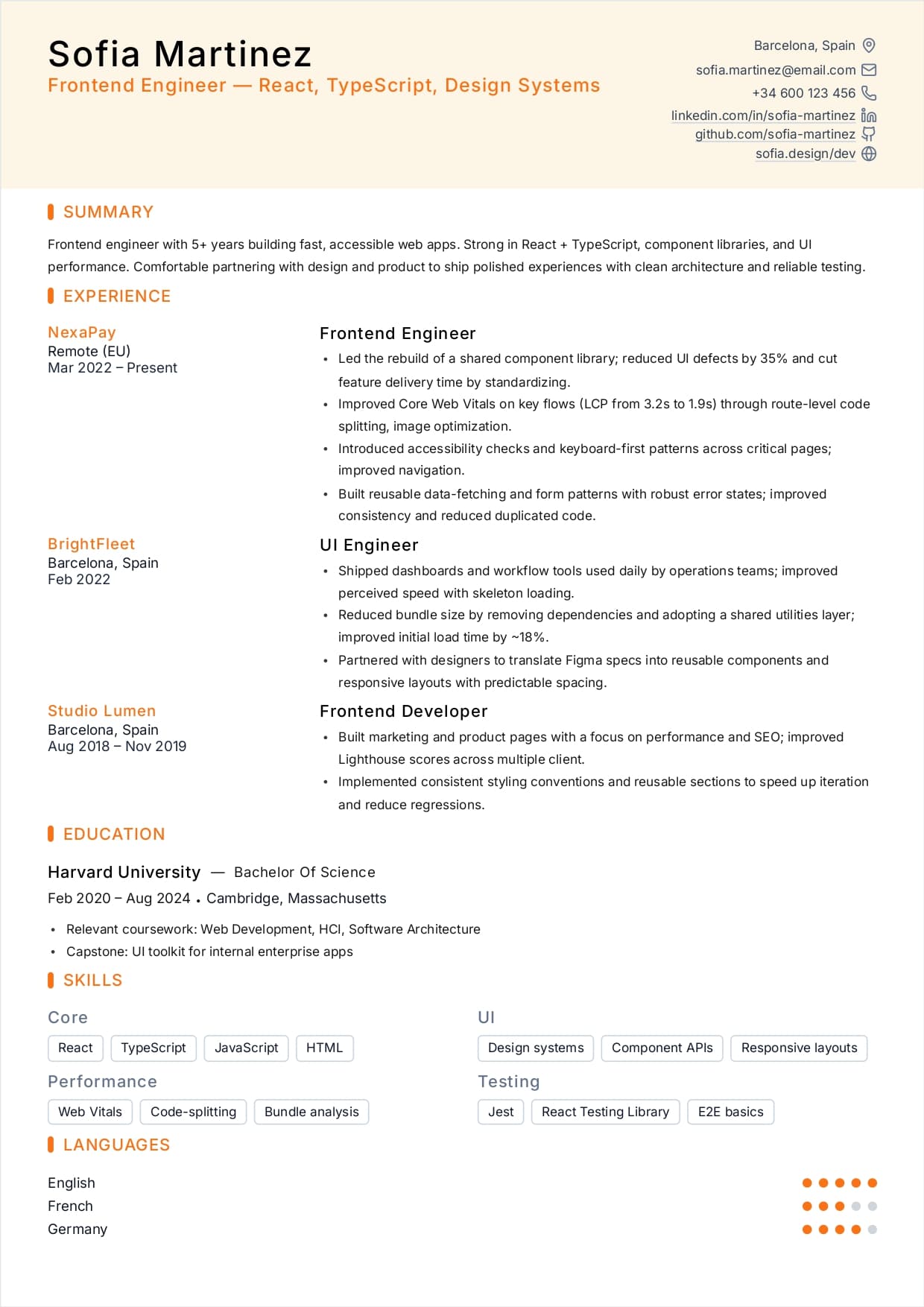
Keep formatting simple: one column, standard headings, and text labels for contact info. Avoid tables, icons as text, and graphics that replace words.
A clean structure also helps humans scan faster, especially on engineering roles with many applicants.
- Use standard section headings: Summary, Experience, Projects, Education, Skills
- Avoid tables, text boxes, and heavy two-column layouts
- Use text labels: Email, Phone, LinkedIn, GitHub
- Avoid skill bars or star ratings
- Keep dates consistent (for example: 2024-04)
If you want to keep a two-column look, make sure the exported PDF still reads correctly when copied as plain text.